
Introduction
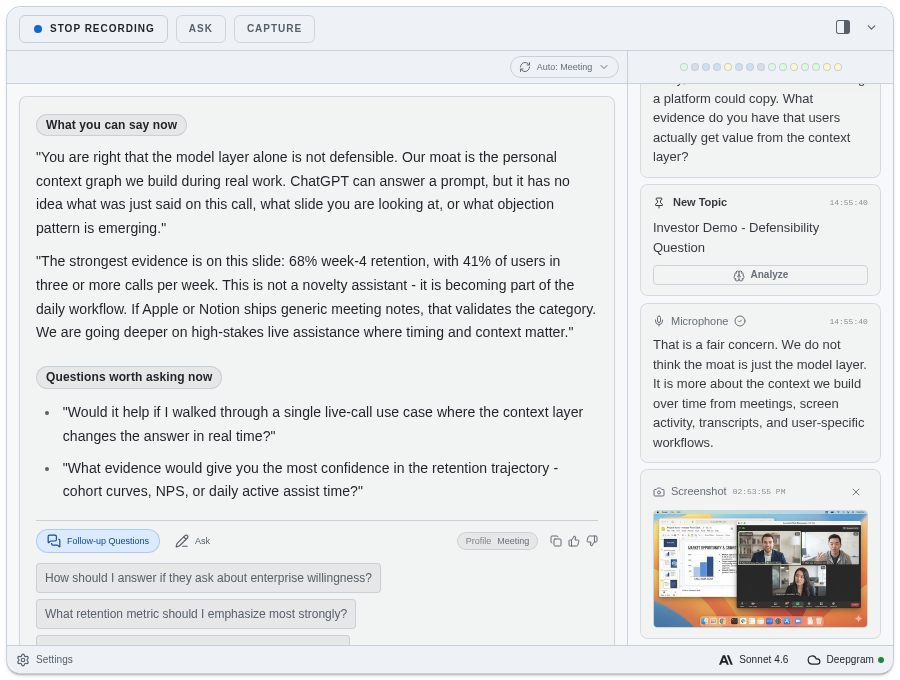
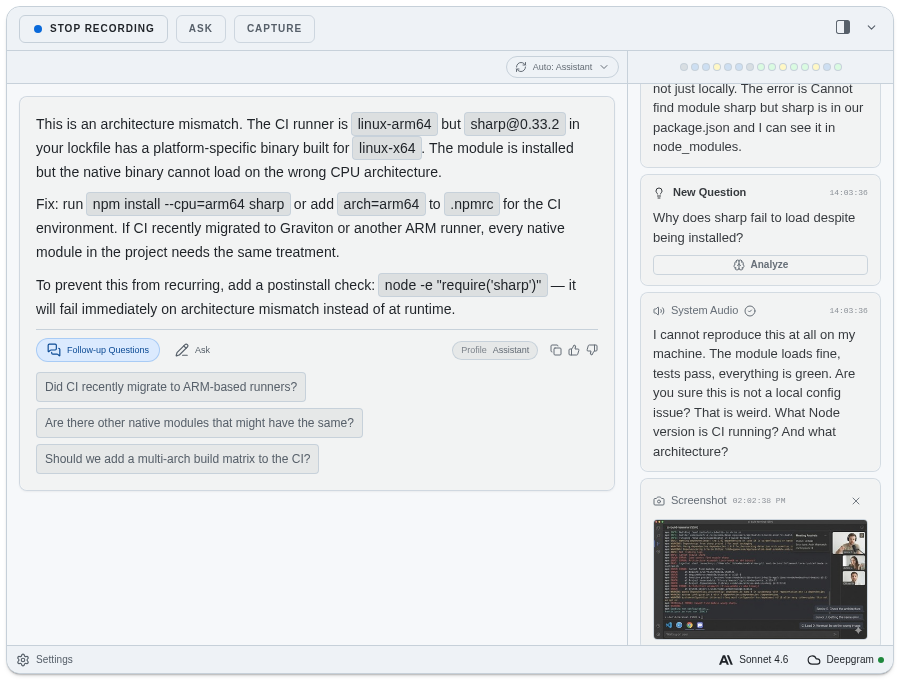
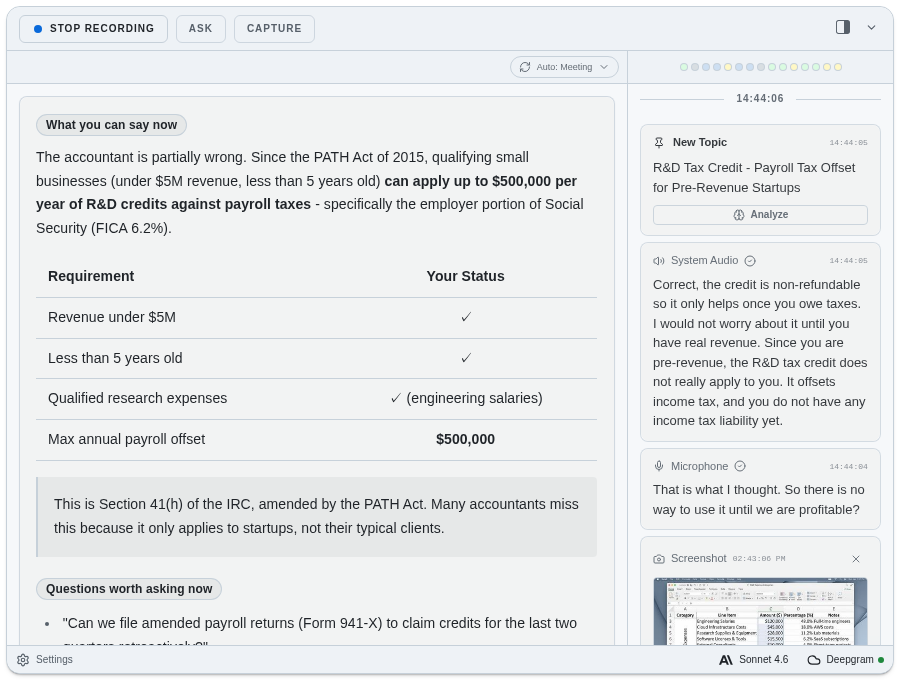
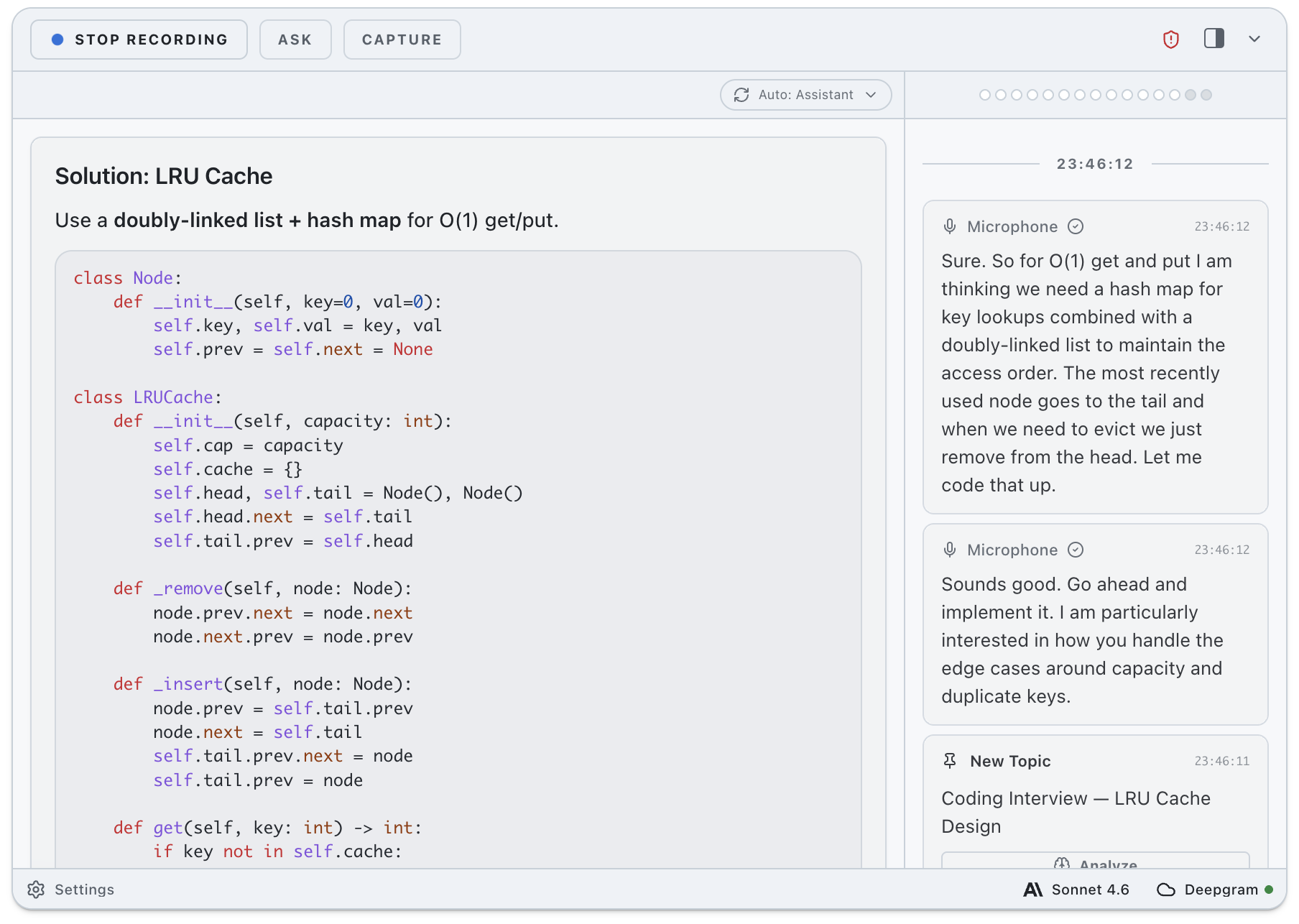
ExtraBrain is a local-first desktop AI copilot for interviews, meetings, lectures, and research sessions. The public site presents it as a Mac app that helps users follow live conversations with transcription, screen-aware context, structured answer support, session memory, and user-controlled model choices. Its strongest fit is for people working through high-pressure live conversations where context moves faster than manual notes.
Key Features
- Live interview and meeting context from audio, transcript text, screenshots, prompts, constraints, and follow-up questions.
- Structured support for coding, system design, behavioral, product, data, ML, consulting, lecture, and research scenarios.
- Local-first setup with local Parakeet transcription and local Gemma 4 on-device AI where installed and compatible.
- Bring-your-own provider options for OpenAI, Anthropic, custom OpenAI-compatible endpoints, Claude Subscription, and Codex Subscription modes.
- Session memory, saved facts, summaries, action items, edge cases, unresolved risks, and post-answer feedback.
- Compatibility signals for major meeting and interview environments, including Zoom, Google Meet, Microsoft Teams, Webex, Slack Huddles, Discord, HackerRank, CoderPad, Codility, and CodeSignal.
Use Cases
ExtraBrain is most relevant when a user needs to listen, reason, and respond while a live session is still moving. A candidate can use it to summarize a coding prompt, list edge cases, and structure a baseline answer before speaking. A system design candidate can turn requirements into components, tradeoffs, and clarifying questions.
For work meetings, the product appears useful for extracting decisions, risks, owners, follow-ups, and unresolved points before the meeting context fades. Customer research teams can use the same live context layer to collect pain points and quotes for roadmap notes, while students can convert lectures into concepts, examples, and review questions.
The important caveat is policy. ExtraBrain's own site reminds users that interview, workplace, school, and platform rules vary. A careful user should verify whether using an AI copilot is allowed in the specific setting before bringing it into an interview, meeting, or assessment.
Pricing
ExtraBrain is free to start. The public pricing page lists a Free plan for the Mac desktop app, live workflow support, local Gemma 4 where installed and compatible, local-first context, local Parakeet transcription, optional Deepgram setup, and BYO provider setup. Pro is listed at $9.99 per month, with a $6.99 Founder monthly price, $79 per year, and a $149 lifetime launch option. The site also notes that external AI provider usage is billed separately by the providers the user chooses, and Enterprise support is available by contact.
User Experience and Support
The setup path is described in three steps: download the Mac app, choose local or cloud transcription, select local Gemma 4 when the hardware supports it or connect provider access, and rehearse once before a real session. That makes the product easier to evaluate because the public page does not hide the operational choices: microphone settings, transcription mode, model provider, and session scope all matter.
Support signals include help center, setup, privacy, and troubleshooting guides, along with enterprise support by contact. The site also emphasizes that ExtraBrain is a desktop app, not a meeting bot joining the room, so users control what to capture and which provider receives selected content.
Technical Details
ExtraBrain is available for Mac today, with Windows and Linux described as planned. The product supports Apple Silicon and Intel Mac, and it can use local Gemma 4 on-device AI where installed and compatible. For transcription, the page mentions local Parakeet and optional Deepgram setup.
The product's technical positioning is model-choice oriented. Users can keep requests on device with a local setup, or explicitly send selected content to external providers such as OpenAI, Anthropic, Claude, Codex, or compatible endpoints. Privacy therefore depends on the selected setup, not only on the app itself.
Pros and Cons
Pros
- Clear identity as a Mac desktop copilot for live interviews, meetings, lectures, and research.
- Local-first design gives users a path to keep transcripts, prompts, screenshots, notes, and context on their Mac when using compatible local components.
- BYO provider support avoids locking users into one hosted AI vendor.
- Pricing separates app access from external model usage, which helps users see where provider costs come from.
- The site gives practical policy reminders instead of pretending every interview or workplace setting permits AI assistance.
Cons
- Mac is the only currently available platform; Windows and Linux are planned but not live according to the public page.
- Local Gemma 4 depends on installation and compatible hardware, so not every user will get the same local AI setup.
- External provider use may introduce separate costs and privacy considerations.
- The value depends heavily on whether a user's interview, workplace, school, or meeting policy allows this kind of support.
FAQ
What is ExtraBrain used for?
ExtraBrain is used as a desktop AI copilot during live interviews, meetings, lectures, and research conversations. It helps capture live context, structure answers, save facts, and generate follow-up material while the session is still active.
Who is ExtraBrain best suited for?
It appears best suited for engineers, candidates, students, founders, product managers, meeting leads, and research teams who need help organizing fast-moving live context. The site particularly highlights coding interviews, system design rounds, meetings, lectures, and customer research.
Does ExtraBrain work locally?
ExtraBrain is described as local-first. It can keep transcripts, prompts, screenshots, and notes on the Mac in a fully local setup when local Gemma 4 and local Parakeet transcription are used, where installed and compatible.
What AI providers can ExtraBrain connect to?
The public site mentions local Gemma 4, OpenAI, Anthropic, custom OpenAI-compatible endpoints, Claude Subscription, and Codex Subscription modes. Users should check which providers fit their budget, privacy expectations, and technical setup.
Is ExtraBrain allowed in interviews?
That depends on the interview, employer, school, or platform policy. ExtraBrain's own page tells users to follow the rules of the setting and avoid misrepresenting their skills.
How much does ExtraBrain cost?
ExtraBrain is free to start. Pro pricing is shown as $9.99 per month, $6.99 per month for the Founder offer, $79 per year, or $149 for the lifetime launch option. External provider costs are separate.
What should users verify before relying on ExtraBrain?
Users should verify platform availability, hardware compatibility for local AI, transcription setup, provider billing, privacy expectations, and policy permission for their specific interview or meeting environment.
Conclusion
ExtraBrain is a focused Mac AI copilot for live thinking rather than a generic note-taking tool. Its public page is strongest on local-first controls, provider choice, interview and meeting use cases, and transparent pricing boundaries. Users who handle high-stakes live conversations may find it worth evaluating, as long as they confirm policy fit and technical compatibility first.