
Introduction
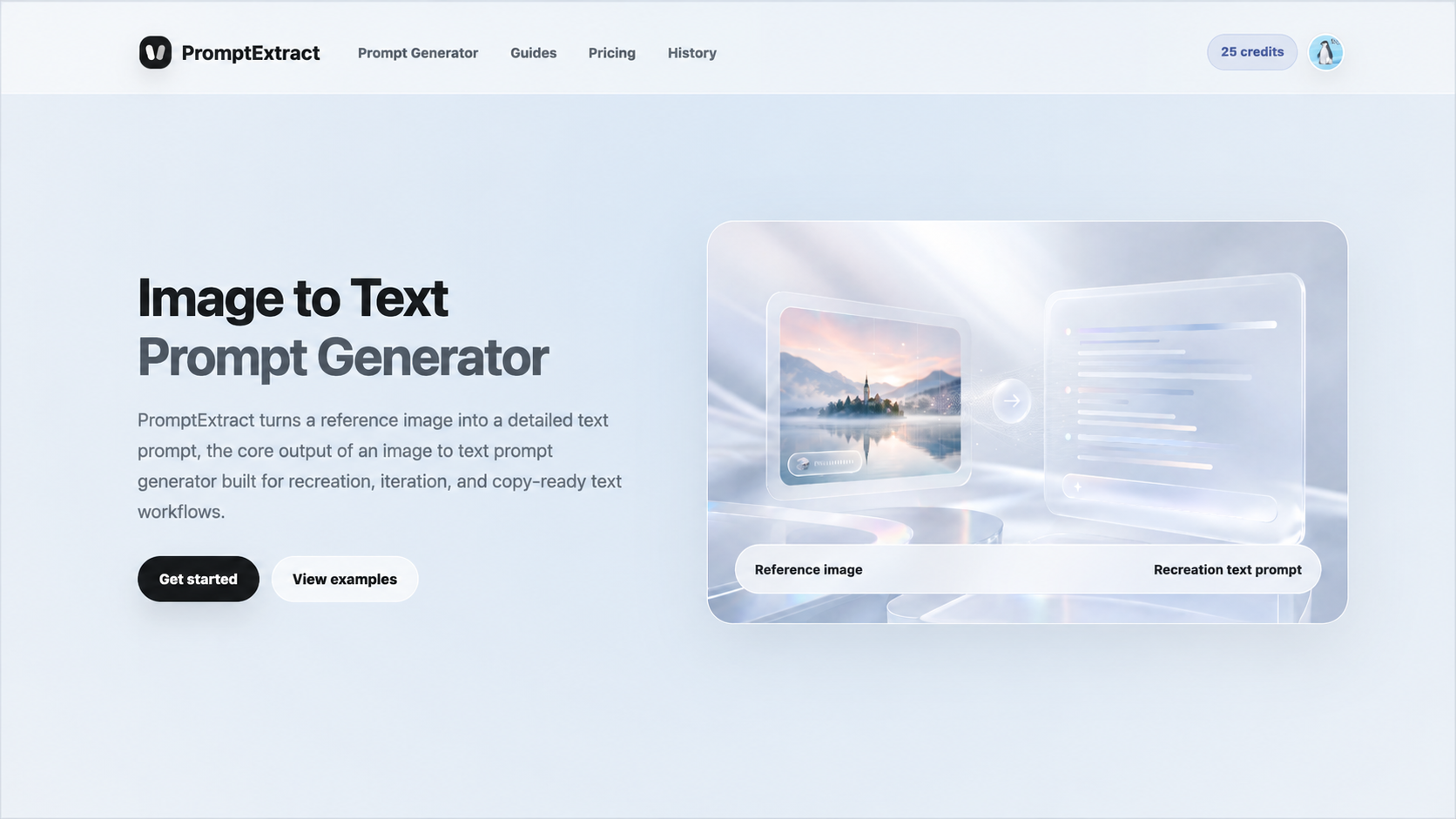
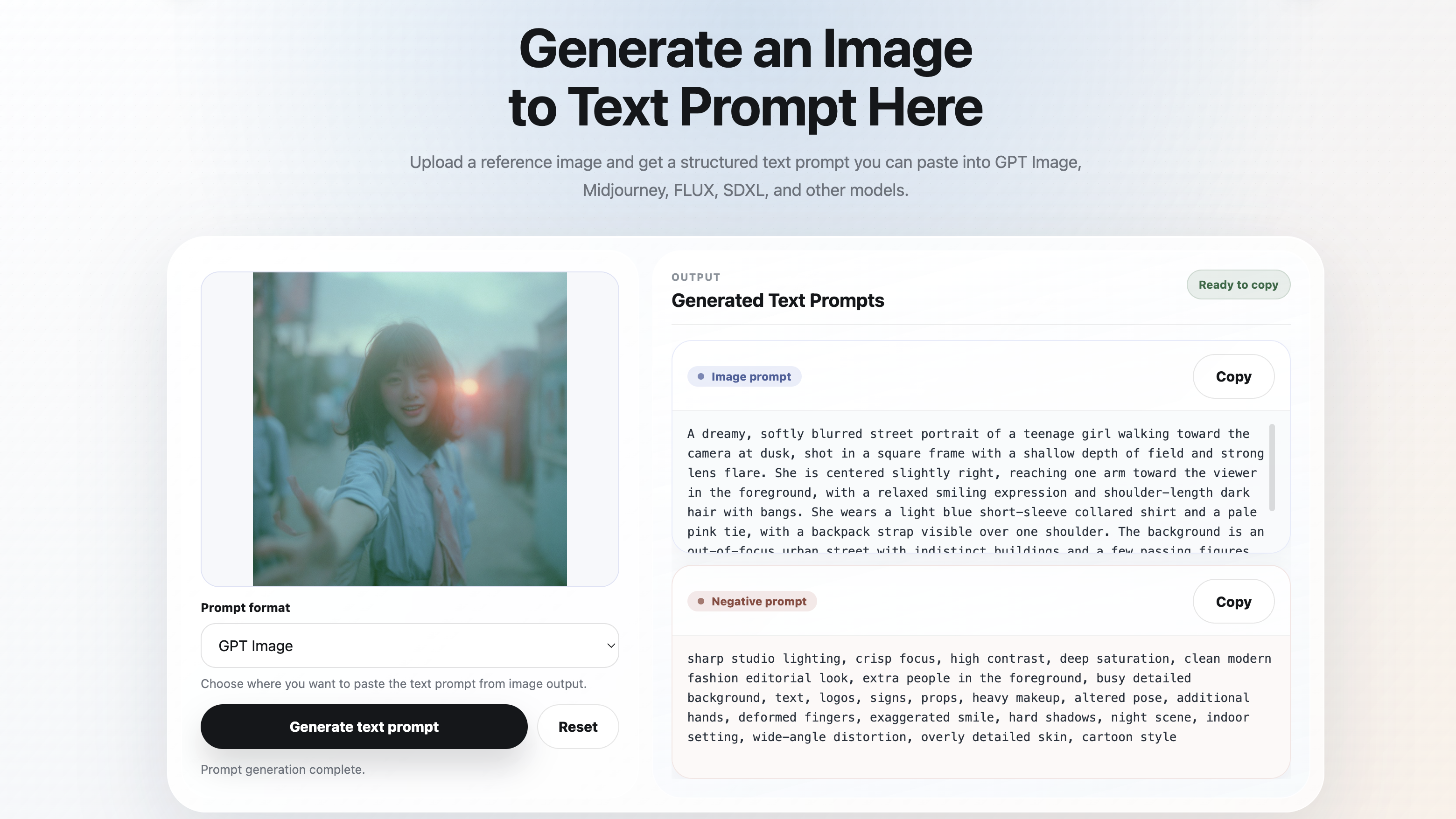
PromptExtract is an image-to-text prompt generator that turns uploaded reference images into structured text prompts for AI image models. Designed for creators who work with GPT Image, Midjourney, FLUX, SDXL, and related tools, it bridges the gap between a visual reference and the written direction a model needs to reproduce or iterate on a specific look.
The core workflow is straightforward: upload an image, select a prompt format, and receive a detailed text description. For designers, illustrators, and anyone who builds prompts from visual references regularly, this removes the guesswork of describing composition, lighting, and style from scratch.
Key Features
- Image upload and prompt generation: Upload a JPG, PNG, or WEBP file (up to 8 MB) and receive a structured text prompt suitable for pasting directly into your image model of choice.
- Multi-format output: Choose from prompt formats tailored to GPT Image, Midjourney, FLUX, SDXL, and other models, each shaped to match the conventions that work best for that platform.
- Case library of examples: Browse a public gallery of copy-ready prompts paired with reference images across photography, illustration, anime, pixel art, cartoon, and more, making it easy to see what a good output looks like before generating your own.
- Saved generation history: Signed-in users can revisit and reuse previous prompts, which is useful for iterative workflows where you return to a successful reference.
- Daily and monthly credit tiers: Start with free daily credits and scale up to Plus or Pro plans for higher volume, supporting both occasional use and prompt-heavy daily workflows.
Use Cases
Visual creators who reference existing images frequently, whether for mood boards, client presentations, or creative exploration, can use PromptExtract to convert a photo or artwork into a descriptive prompt without manually writing each detail. The tool is particularly useful when working across different AI image models that each respond better to specific prompt structures, since it lets you switch output formats without re-describing the source image.
Marketing teams and SEO specialists working on product photography or campaign visuals may find it helpful for generating consistent prompt libraries from reference imagery. The case library also serves as a learning resource for prompt engineering, showing how different visual styles translate into structured text across categories like architectural photography, food styling, character design, and landscape composition.
Pricing
PromptExtract operates on a freemium credit-based model. The Free plan provides 2 daily credits at no cost, suitable for occasional prompt generation. The Plus plan offers up to 500 prompts per month and is positioned for repeated reference-image work. The Pro plan provides up to 1,200 prompts monthly at a lower effective price per generation, aimed at daily workflows and larger batches of visual references. Users can choose between monthly or yearly billing cycles for paid plans.
User Experience and Support
The interface centers on a single upload-and-generate flow, keeping the interaction minimal. The site provides a Guides section visible in the navigation, though the full scope of documentation and support channels is not detailed on the public-facing pages. Google sign-in is required for accessing history and billing features, and plan selections are recorded as first-party analytics events.
Technical Details
PromptExtract supports JPG, PNG, and WEBP input formats with an 8 MB file size limit. The tool outputs multiple prompt format options, including direct recreation prompts (with subject, composition, lighting, texture, and style preserved), GPT Image natural language descriptions, and richer art direction prompts that include camera language, mood, and composition cues. The platform runs as a web application and does not appear to offer a public API, browser extension, or SDK at this time.
Pros and Cons
Pros
- Clean, focused workflow that gets from image to prompt in a single step
- Multiple output formats cover the most popular AI image models without requiring manual prompt rewriting
- Free daily credits make the tool accessible for light or exploratory use
- The public case library serves both as a reference and a prompt engineering learning tool
Cons
- Google sign-in is required to access history and billing, which may be inconvenient for users who prefer email or other authentication methods
- No public API or integration options are visible, limiting automation potential for teams that generate prompts at scale
- Support and documentation details are not prominently featured on the public pages, so it is worth confirming response channels before relying on the tool for time-sensitive workflows
FAQ
What is PromptExtract and what problem does it solve?
PromptExtract is an image-to-text prompt generator that converts uploaded reference images into detailed text prompts. It is designed for users of GPT Image, Midjourney, FLUX, SDXL, and other AI image models who want structured prompts without manually describing every visual element.
Who is PromptExtract best suited for?
The tool appears most relevant for designers, illustrators, prompt engineers, and marketing teams who regularly work with visual references and need to translate images into model-specific text prompts. It may also be useful for anyone exploring prompt engineering who wants to study how visual styles map to structured descriptions.
What prompt output formats does PromptExtract support?
The site shows support for GPT Image (natural language format), Midjourney, FLUX, and SDXL. Each format shapes the output to match the conventions expected by the target model, which means you can switch between models without rewriting the underlying description.
What file formats and size limits does the upload support?
PromptExtract accepts JPG, PNG, and WEBP files up to 8 MB in size. These are the standard web image formats, so most reference images should work without conversion.
Does PromptExtract offer a free plan?
Yes. The Free tier provides 2 daily credits at no cost. For higher volume, the Plus and Pro plans offer monthly credit pools with yearly billing available at a discount. The exact pricing for paid tiers is visible on the pricing page.
Is there an API or integration available for automation?
No public API, SDK, or browser extension is visible on the site. If you need to generate prompts programmatically or integrate the tool into an automated pipeline, this capability is not currently advertised, and it would be worth reaching out through the site to confirm whether it is on the roadmap.
What should I verify before relying on PromptExtract for professional work?
Since the support and documentation pages are not prominently featured, it is worth confirming response times, the full terms of the paid plans, and whether the tool's output quality consistently matches the examples shown in the case library for your specific use case and image type.
Conclusion
PromptExtract fills a specific niche in the AI image creation workflow: converting visual references into model-ready text prompts. With its multi-format output and accessible free tier, it is a practical option for anyone who builds prompts from images regularly. The public case library adds educational value, and the credit-based pricing model scales reasonably from occasional to daily use. For teams considering it, confirming support channels and checking whether the output quality holds up for your specific reference images would be a sensible next step.