

Introduction
Messy2Sheet is a document-to-Excel converter built for business files that do not follow a fixed template. Users upload PDFs, scans, screenshots, spreadsheets, or pasted text, describe the table they want in plain language, preview the generated workbook, and download the result as Excel or CSV. The tool handles the structure extraction and organization that basic OCR tools skip - turning readable text into rows, columns, and separate sheets that are ready for review. For teams that regularly clean up bank statements, invoices, purchase orders, and other inconsistent documents, Messy2Sheet offers a way to skip manual data entry without building a custom extraction pipeline.
Key Features
- Multi-Format Input - accepts PDFs, images, TXT, CSV, XLSX files, and pasted text; multiple files can be processed in a single run
- Natural-Language Table Requests - users describe the desired output in plain words, specifying columns, totals, formulas, checks, or separate tabs
- Three Output Modes - Simple for one-time files, Workflow for repeat jobs with saved rules, and Template for fixed output formats
- Workbook Preview - users see the source file and the finished sheet before downloading, with the option to adjust and regenerate
- Follow-Up Chat - paid plans support follow-up prompts that create new versions of the same sheet without starting over
- Saved Workflows - Pro and higher plans let users save extraction rules and rerun them when the same document type returns
- Merge Excel Files - combine multiple Excel or CSV files into one workbook, one sheet, or separate tabs with source tracking
- Excel Formula Generator - describe calculations, checks, or totals in natural language and add them to the output sheet
Use Cases
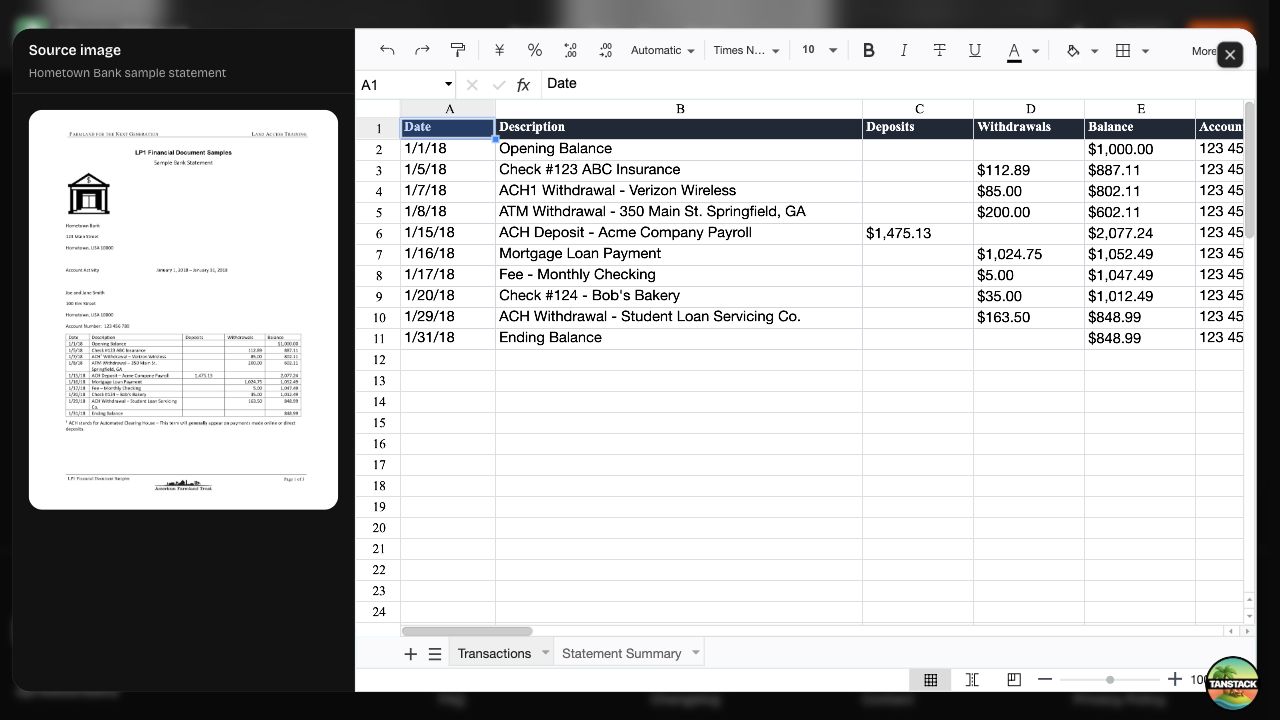
Accounting teams that receive bank statements in varying layouts can use Messy2Sheet to extract transaction rows - dates, descriptions, deposits, withdrawals, balances, and fees - into a consistent ledger format. The site shows a sample bank-statement conversion where the output preserves running balances and account fields aligned with the source image.
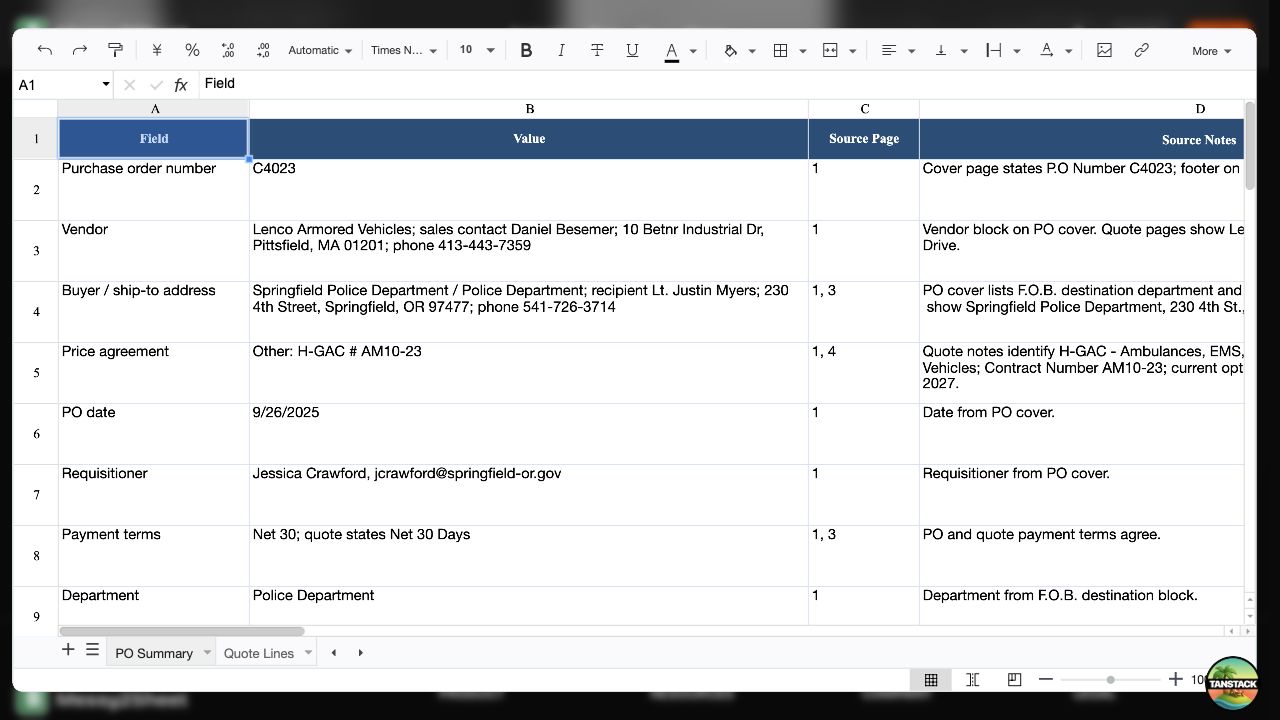
Procurement departments processing vendor invoices and purchase orders can pull supplier details, invoice numbers, dates, taxes, totals, and line items into a review-ready sheet. The tool handles PO packets that include shipping terms, quote options, approvals, and freight, which reduces the time spent manually rekeying header and line data.
Operations teams that need to consolidate multiple spreadsheets into a single report can use the merge feature to combine Excel or CSV files into one workbook with source tracking. This is useful when regional teams submit data in separate files that need to be rolled up into a master view.
Pricing
Messy2Sheet offers a free tier and three paid plans:
- Free - 2 lifetime credits, generate new sheets, up to 10 files per run, no follow-up chat, no saved workflows
- Starter - $19.9/month: 20 credits per month, up to 20 files per run, follow-up chat creates new versions, save and run workflows
- Pro - $29.9/month: 40 credits per month, up to 50 files per run, follow-up chat, saved workflows (marked as Popular)
- Ultra - $59.9/month: 100 credits per month, up to 100 files per run, follow-up chat, saved workflows
The pricing page lists these tiers and includes FAQ entries on payment methods, refunds, and support. The free tier provides a way to test the tool before committing to a subscription.
User Experience and Support
The workflow follows four steps: upload the file, describe the table needed, preview the workbook, and download or save the setup. The site emphasizes that users can ask for columns, totals, formulas, checks, or separate tabs in normal words rather than configuring extraction rules manually.
Support resources include a FAQ section covering file types, refund policy, payment methods, and how to get help. The site also lists a Contact page and a Data Security page. The footer links to Privacy Policy, Terms of Service, and Cookie Policy pages.
Technical Details
Messy2Sheet runs as a web application. Input formats include PDF, image files, TXT, CSV, and XLSX. Output formats are Excel (.xlsx) and CSV. The tool performs structure extraction and organization beyond OCR - the site explicitly states that OCR only reads text, while Messy2Sheet also organizes it into rows, columns, and separate sheets. The three output modes (Simple, Workflow, Template) allow users to choose between one-time extraction, repeatable saved rules, or fixed-format templates. No API, browser extension, or third-party integration is mentioned on the fetched pages.
Pros and Cons
Pros
- Handles messy, inconsistent business documents that do not fit a fixed template
- Natural-language table requests remove the need to configure extraction rules manually
- Workbook preview lets users verify output before downloading
- Saved workflows reduce repetitive setup for recurring document types
- Free tier with 2 lifetime credits allows testing without payment
- Merge and formula-generator features extend usefulness beyond basic extraction
Cons
- Credit-based pricing may require monitoring for heavy users
- No visible API, browser extension, or automation integrations
- Maximum file counts per run vary by plan and may constrain large batch jobs
- Follow-up chat and saved workflows are not available on the free tier
FAQ
What is Messy2Sheet and what does it do?
Messy2Sheet is a document-to-Excel converter that extracts structured data from PDFs, scans, screenshots, spreadsheets, and pasted text. Users describe the table they want in plain language, preview the output, and download Excel or CSV files. The tool handles documents that do not follow a fixed template.
How is Messy2Sheet different from OCR?
OCR reads the text from an image or PDF but does not organize it. Messy2Sheet goes a step further by structuring the extracted text into rows, columns, and separate sheets that are ready for review and analysis.
What file types can Messy2Sheet process?
The tool accepts PDFs, scans, screenshots, images, emails, spreadsheets (CSV, XLSX), and pasted text. If a person can read the content and copy it into a sheet, it is usually a good candidate, according to the site FAQ.
Is there a free plan?
Yes. The free tier includes 2 lifetime credits, up to 10 files per run, and basic sheet generation. Follow-up chat and saved workflows are not included. The free tier is intended for testing before committing to a paid plan.
What does a credit cover?
Each credit allows one sheet-generation run. The number of files per run depends on the plan: 10 on Free, 20 on Starter, 50 on Pro, and 100 on Ultra. Follow-up chat that creates new versions and saved workflows are available on paid plans.
Can I save extraction rules for recurring documents?
Yes. The Workflow mode lets users save rules and rerun them when the same document type returns. This feature is available on Starter, Pro, and Ultra plans.
How do I get support if something goes wrong?
The site includes a FAQ section, a Contact page, and a Data Security page. The FAQ addresses common questions about file types, refunds, and payment methods. For direct support, the Contact page is the listed channel.
Conclusion
Messy2Sheet targets a specific pain point - business documents that are readable but not structured, and that vary too much to fit a fixed template. The natural-language table request, workbook preview, and saved-workflow features make it practical for teams that would otherwise spend hours on manual data entry or custom extraction scripts. The free tier provides a low-risk way to test whether the tool handles the document types in question. For accounting, procurement, and operations teams that regularly clean up inconsistent files, the Messy2Sheet site is worth a closer look.