
Introduction
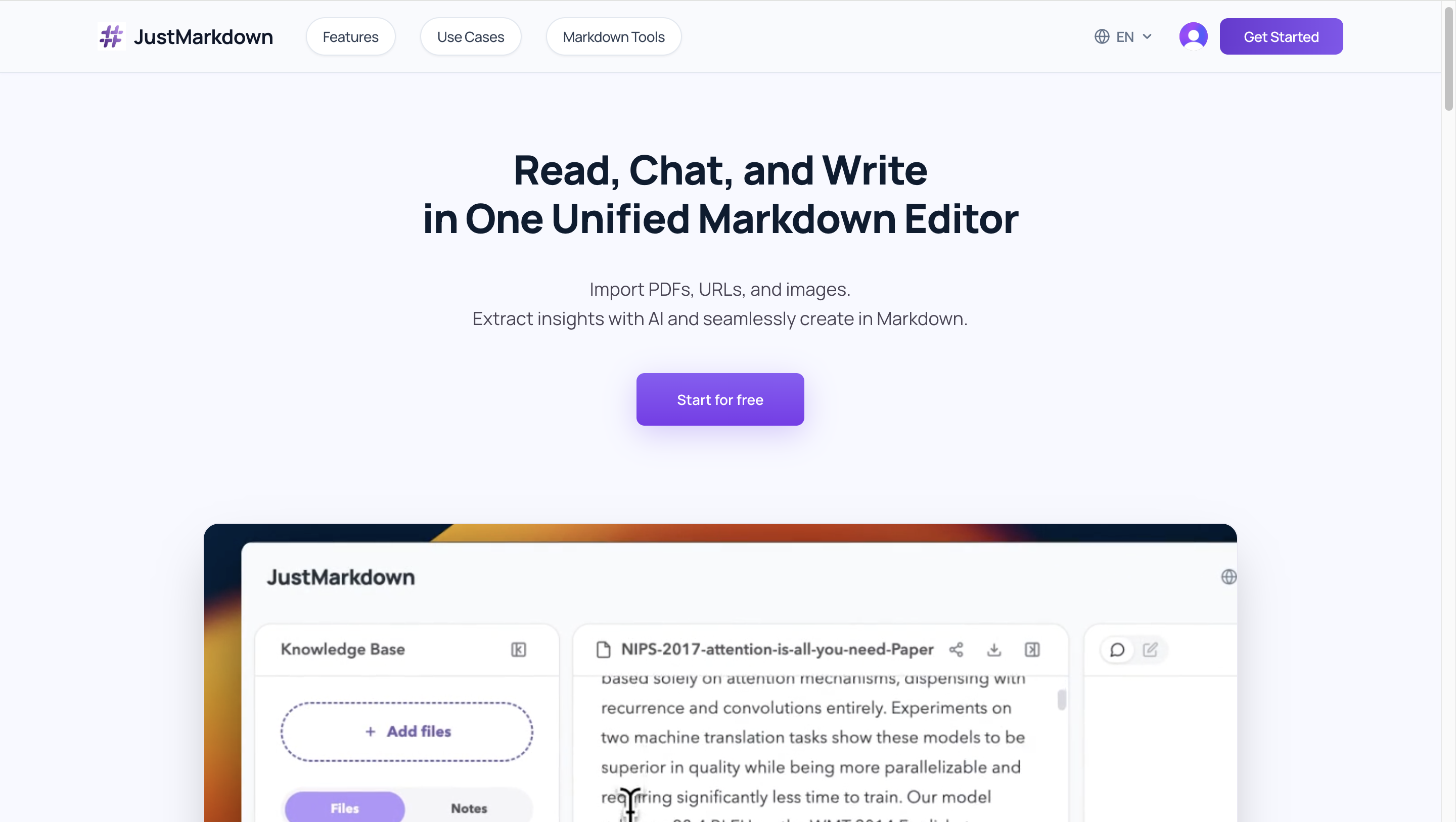
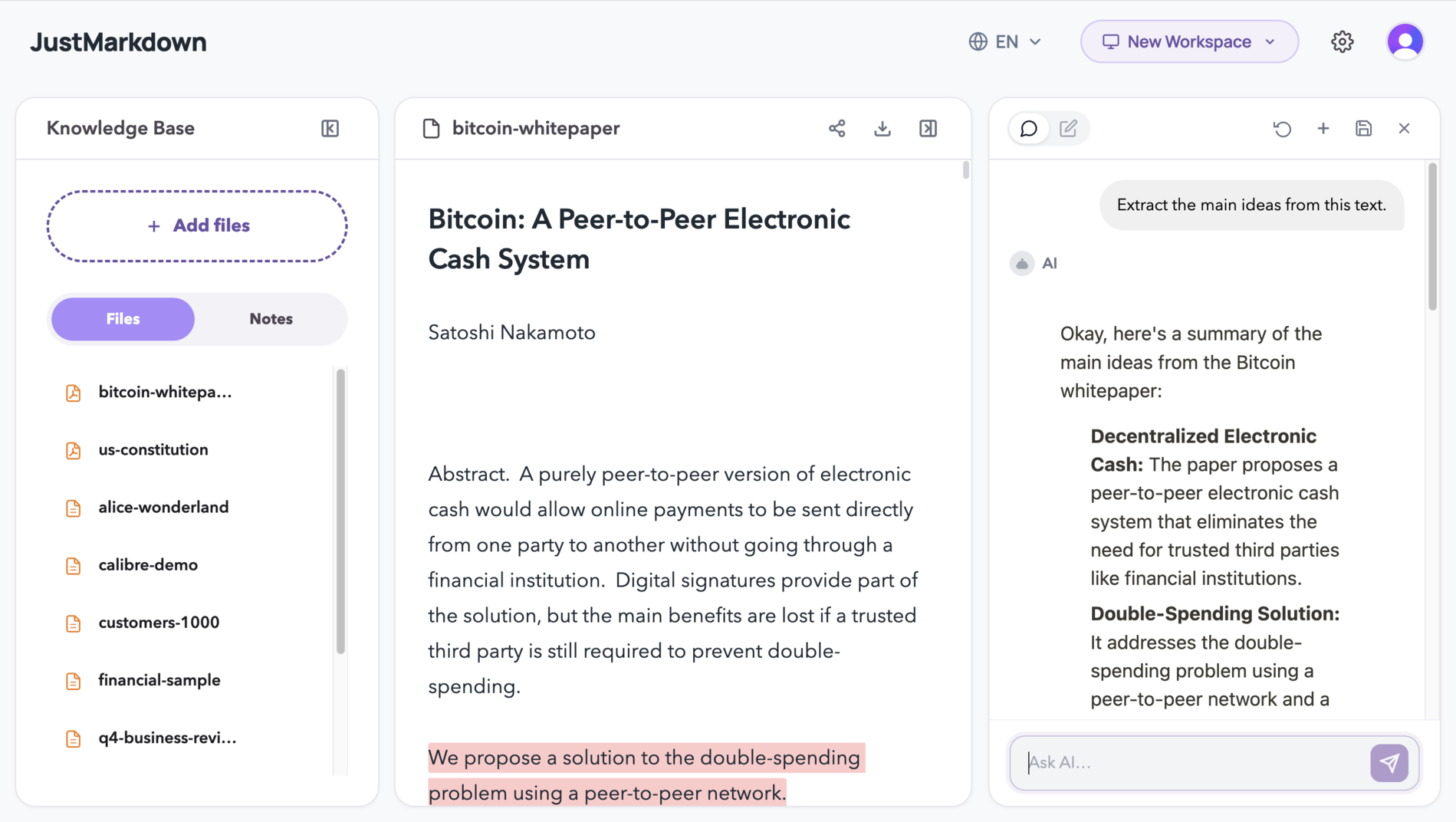
JustMarkdown is a workspace that combines format conversion, AI-assisted reading, and Markdown writing into a single three-pane interface. Users can import PDFs, Word documents, web pages, images, and AI chat transcripts, convert them into clean Markdown, then read, annotate, and refine the output without leaving the tool. The site positions it as a step beyond one-off converters: conversion is the starting point, and the workspace handles everything that comes after - highlighting, questioning, drafting, and exporting. For knowledge workers who regularly move from messy source material toward a structured draft, the three-pane layout is designed to keep reading and writing side by side.
Key Features
- Format-to-Markdown Conversion - import PDFs, Word files, web pages, spreadsheets, screenshots, and AI conversations; the tool cleans the layout and converts the content into structured Markdown in one step
- AI Reading Assistant - a built-in chatbot that can summarize long articles, explain difficult concepts, or parse technical details; AI responses can be appended directly to the workspace as Markdown text
- Dual-Pane Workflow - the left pane supports deep annotation and highlighting of source content, while the right pane provides an independent note-taking area for copying excerpts and drafting ideas
- WYSIWYG Markdown Editor - a distraction-free writing environment with real-time rendering and a built-in typography engine; finished files export as .md with a single click
- EPUB and PDF Reading - the workspace supports reading full-length documents, not just converting them, which allows annotation and AI interaction with the source material
Use Cases
Developers and founders who need to turn API documentation, product specs, or technical references into structured Markdown can import the source, use the AI assistant to extract and format key details, and export a clean draft without switching between a reader, a chat window, and a text editor. The site highlights this workflow as a way to go from raw concept to shareable document in one session.
Lifelong learners studying complex material can ask the AI to simplify difficult concepts alongside the reading pane, then pull definitions and explanations into the right-hand note area as structured study notes. The dual-pane layout keeps the source and the notes visible at the same time, which reduces the back-and-forth that typically happens when reading and note-taking live in separate apps.
Researchers and analysts working through long academic papers can have the AI summarize methodologies and highlight findings, then draft literature review sections in the right-hand editor while keeping the original source aligned on the left. The site describes this as a way to maintain source-to-note alignment throughout the research process.
Pricing
The public page does not display pricing, plan tiers, or a free-trial offer. Whether JustMarkdown is free, freemium, or subscription-based is not stated. Users should check the JustMarkdown site for current pricing details before committing to the tool for ongoing work.
User Experience and Support
The three-pane layout - source content on the left, notes on the right, and AI chat accessible within the same view - is the central design choice. The site emphasizes that reading and writing happen in parallel rather than in separate steps, which reduces the friction of moving between tools. The WYSIWYG editor strips visual clutter in favor of a minimalist writing surface.
The site includes a FAQ section covering the workspace and conversion workflow, which addresses how JustMarkdown differs from a one-off converter and what formats it handles. Beyond that, support channels such as email, live chat, or a help center are not prominently visible on the fetched page.
Technical Details
JustMarkdown runs as a web application. The tool handles PDFs, EPUB files, Word documents, web pages (via URL import), spreadsheets, screenshots, and AI chat transcripts as input formats. Output is clean Markdown exportable as .md files. The AI assistant operates within the workspace for summarization, explanation, and content extraction. The site does not disclose the underlying AI model, API access options, browser extensions, or integration capabilities. The JSON-LD markup classifies it as a ProductivityApplication.
Pros and Cons
Pros
- Combines conversion, reading, AI assistance, and writing in one workspace instead of requiring separate tools
- Dual-pane layout keeps source material and notes visible simultaneously
- AI insights can be appended directly to the workspace as Markdown, reducing copy-paste friction
- Supports a wide range of input formats including PDFs, Word, web pages, and AI chats
- One-click .md export integrates with existing knowledge-base workflows
Cons
- Pricing and plan details are not visible on the public page
- Support channels beyond the FAQ are not clearly listed
- No mention of API access, browser extensions, or third-party integrations
- Only the homepage was available for evaluation; deeper feature documentation may exist on unfetched pages
FAQ
What is JustMarkdown and what does it do?
JustMarkdown is a web workspace that converts PDFs, Word documents, web pages, images, and AI chat transcripts into clean Markdown, then lets users read, annotate, and refine the output in a three-pane interface with a built-in AI assistant.
How is JustMarkdown different from a standard Markdown converter?
A one-off converter produces a file and stops. JustMarkdown treats conversion as the first step: after the Markdown is generated, users can continue reading the source, highlighting passages, asking the AI questions, and drafting notes - all within the same workspace. The site explicitly positions this as the core distinction.
Who is JustMarkdown built for?
The site identifies three user groups: developers and founders who need to turn technical documentation into structured drafts, lifelong learners who want to study and take notes side by side, and researchers and analysts who need to summarize long papers and draft literature reviews. More broadly, it targets knowledge workers who move from messy source material toward a cleaner final draft.
What file formats can JustMarkdown import and export?
The tool imports PDFs, Word files, web pages (via URL), spreadsheets, screenshots, and AI chat transcripts. Output is exported as .md Markdown files. The site does not mention other export formats.
Does JustMarkdown have a free plan or free trial?
Pricing information is not visible on the public page. The site does not state whether a free tier, trial period, or subscription is required. Users should verify access terms on the JustMarkdown site before building a workflow around it.
Can I use JustMarkdown with my existing note-taking or knowledge-base tools?
The tool exports .md files, which are compatible with most Markdown-based knowledge systems. However, no direct integrations, API access, or browser extensions are mentioned on the public page. If connecting JustMarkdown to a specific tool matters, users should confirm what options are available.
Conclusion
JustMarkdown addresses a real gap between format conversion and actual knowledge work: most converters produce a file and stop, while JustMarkdown keeps the converted content inside a workspace where reading, AI-assisted analysis, and drafting happen together. The dual-pane layout and one-click AI-to-workspace transfer are practical features for anyone who regularly turns source material into structured output. The main unknowns are pricing and support depth, neither of which appear on the public page. For knowledge workers who want to test whether the three-pane workflow fits their process, the JustMarkdown site is the place to start.